An internal helpdesk chatbot answers the questions your own employees ask every week. Where is the travel policy, how do I claim a laptop, and who approves this invoice. The questions are dull, though the volume is not.
Most of those questions arrive in Slack or Microsoft Teams, because that is where people already work. Therefore the assistant belongs there too, rather than behind another portal login.
So this guide covers the parts that decide whether the project survives: identity, permissions, content ownership and rollout. I have built these systems at Exuverse, so the advice comes from deployments rather than from a feature list.
What an internal helpdesk chatbot replaces
First, look at a month of IT and HR tickets. A large share of them are lookups, not incidents, since somebody simply wants a number, a link or a rule.
Those requests also cost twice. First a person waits, and then a specialist stops what they were doing. Consequently the team loses focus on the work that genuinely needs judgement.
| Request type | Share of internal volume | Good fit for automation |
|---|---|---|
| Policy and process lookups | High | Yes, answer with a citation |
| Access and licence requests | Medium | Yes, raise the ticket with full context |
| Onboarding questions | Medium | Yes, plus a checklist reply |
| Payroll and leave queries | Medium | Only with strict entitlement checks |
| Broken hardware or outages | Low | No, route to a person quickly |
| Sensitive people matters | Low | No, keep these human |
Now notice the last two rows. A helpful assistant knows its limits, and a fast handoff builds more trust than a confident guess. The same principle drives customer-side ticket deflection.
Slack or Microsoft Teams: what changes in the build
The retrieval core stays identical across both platforms, so most of the work carries over. The wrapper, however, differs in ways that surprise teams during the second week.
| Concern | Slack | Microsoft Teams |
|---|---|---|
| Install unit | App manifest with scoped tokens | App package approved in the admin centre |
| Identity | Slack user ID mapped to your directory | Entra ID object arrives with the activity |
| Approval path | Workspace owner, usually quick | Tenant admin, usually slower |
| Conversation shape | Threads keep context tidy | Channel replies and chats behave differently |
| Rich replies | Block Kit | Adaptive Cards |
| Common blocker | Scope creep in the manifest | Waiting on tenant approval |
Plan for both surfaces even if you start with one. Since companies rarely stay on a single platform, a rebuild later costs far more than an abstraction now.
How an internal helpdesk chatbot answers a question
Nine steps sit between a message in a channel and a useful reply, though the employee sees only two. The diagram below traces the whole path too.
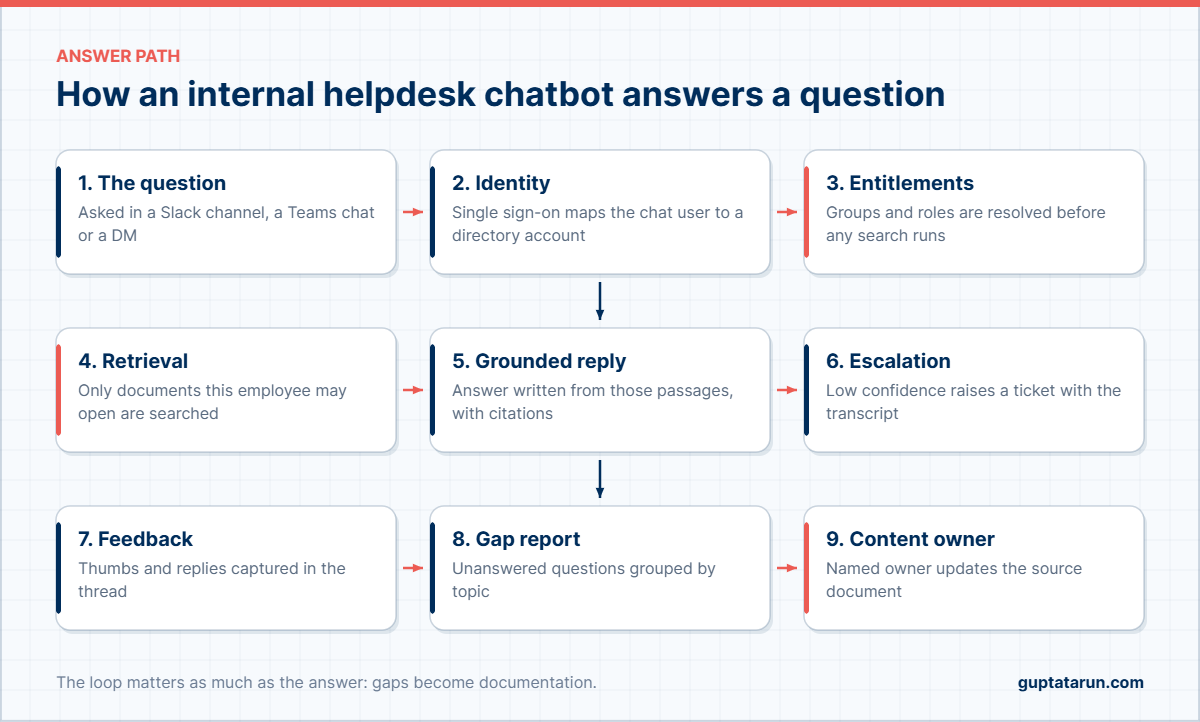
Identity resolves first, before any search runs. Then the chat platform gives you a user, and single sign-on maps that user to a directory account with real group membership.
Retrieval then runs inside those entitlements. The assistant writes its answer from the passages it found and shows the citation, so an employee can open the source and confirm.
The final three steps are also the ones teams skip. Feedback, gap reporting and a named content owner turn the assistant into a documentation engine. Otherwise quality decays quietly over a quarter.
Permission-aware retrieval is the hard part
Customer assistants read public content. Internal ones, though, read salary letters, board decks and disciplinary notes. Consequently the access model, not the model choice, decides whether security signs off.
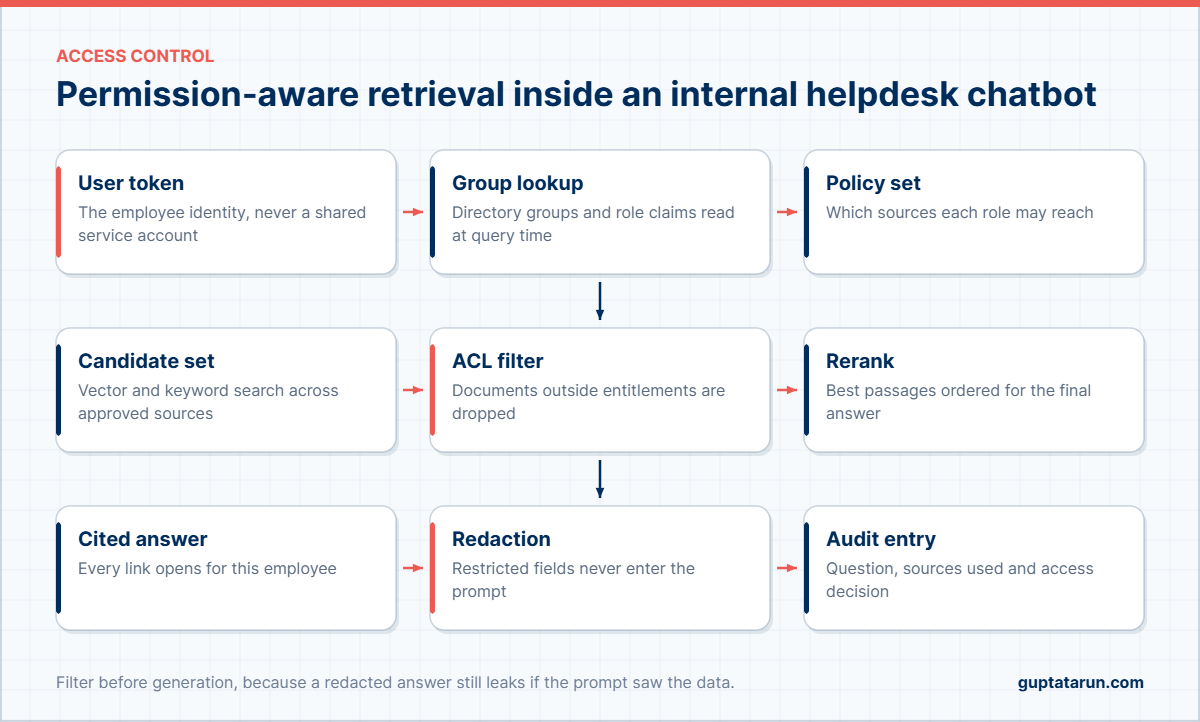
Map identity properly, once
So use the employee’s own identity for every query. A shared service account is quicker to wire, yet it gives the assistant more reach than any single person has. As a result, one badly worded question could surface a document the asker may never see.
Read group membership at query time rather than caching it for a day. Since people change teams, stale groups are how leavers keep access.
Filter before generation, never after
Some products retrieve everything and then strip restricted content from the reply. That approach fails, because the restricted text already entered the prompt. Instead, drop unauthorised documents from the candidate set first.
Test this deliberately too. For example, ask the assistant, as an ordinary employee, for the leadership compensation plan. The right answer says the document exists yet stays out of reach.
Log the access decision, not just the answer
Your audit line should record the question, the sources consulted and the entitlement decision. Auditors ask about the second and third parts, and a transcript alone will not satisfy them.
If you handle Indian employee data, align this logging with your obligations under the DPDP Act and data residency commitments. Notice periods and deletion requests both depend on it too.
The content an internal helpdesk chatbot needs on day one
Assistants also inherit the quality of your documentation. A tidy wiki produces good answers, while a shared drive of undated files produces confident nonsense.
So start narrow. Pick the ten documents that generate the most questions, give each one an owner, and connect only those. Afterwards you can widen the index week by week.
| Source | Typical owner | Refresh | Watch out for |
|---|---|---|---|
| HR policy library | HR operations | Quarterly | Superseded versions still in the folder |
| IT runbooks | IT support lead | Monthly | Screenshots that no longer match |
| Finance and expense rules | Finance controller | Quarterly | Limits that changed mid-year |
| Onboarding material | People team | Per intake | Links to retired tools |
| Ticket resolutions | Service desk | Weekly | One-off fixes read as policy |
Retire duplicates before you connect anything. If two versions of one policy exist, both will be retrieved, and the assistant cannot know which one your legal team blessed.
Rolling out an internal helpdesk chatbot without a dead pilot
Pilots die from silence rather than from failure. Once the assistant launches in a general channel, a few people try it, and nobody returns. Therefore treat adoption as part of the build.
| Week | Move | Exit criteria |
|---|---|---|
| Week 1 | Connect ten documents, test with the support team only | Correct and cited on 90 percent of the question set |
| Week 2 | Add single sign-on and entitlement filtering | Zero restricted documents in test answers |
| Week 3 | Open to one department inside their own channel | Repeat usage from half the department |
| Week 4 | Add ticket creation with transcript handoff | Escalations arrive with full context |
| Weeks 5 to 8 | Widen sources, publish the gap report weekly | Unanswered questions falling week on week |
Two details still drive adoption more than anything else. First, launch inside the channel where the questions already appear. Second, answer in the thread, so the reply lives beside the question.
Measuring deflection and trust
Usage counts also flatter everybody. Measure resolution and trust instead, because those numbers survive a budget review.
| Metric | Definition | Target by day 90 |
|---|---|---|
| Self-service resolution | Questions closed with no ticket raised | 40 to 60 percent |
| Citation open rate | Answers where somebody opened the source | Above 20 percent |
| Repeat use | Employees asking again within 30 days | Above 50 percent |
| Escalation context | Tickets arriving with transcript attached | 100 percent |
| Gap closure time | Days from reported gap to updated document | Under 14 days |
| Median time to answer | Message sent to reply read | Under 30 seconds |
Gap closure time, meanwhile, is the leading indicator. When documentation improves quickly, answers improve too, and the whole loop compounds. For the platform decision behind these numbers, compare options in my guide to the best AI chatbot for enterprise data and the cost model in enterprise AI chatbot pricing.
One more habit also pays off later. Also give the assistant a small set of typed actions, such as raising a ticket or requesting a licence. My guide to the agentic AI chatbot covers how to add those safely.
How the assistant sits beside your ticketing tool
Your service desk still stays the system of record. Meanwhile the assistant becomes the front door, and the two only need three connections between them.
The first connection creates a ticket when the assistant cannot resolve a question. It should attach the transcript, the sources it consulted and the requester’s details. Consequently the agent starts with context instead of a one-line summary.
The second connection reads status back. When somebody asks about their laptop request, the assistant looks it up rather than guessing. Still, that single ability removes a surprising volume of follow-up messages.
The third connection is the feedback loop. Resolved tickets also often contain the answer that was missing from your documentation. Therefore export them weekly and turn the repeated ones into policy pages.
| Connection | Direction | Why it matters |
|---|---|---|
| Ticket creation | Assistant to service desk | Escalations arrive with transcript and sources |
| Status lookup | Service desk to assistant | Removes chase-up messages |
| Resolution export | Service desk to documentation | Turns repeat fixes into published answers |
Mistakes that sink an internal helpdesk chatbot
Five patterns account for most disappointing pilots, and each one is avoidable.
The first is connecting everything on day one. For example, a drive with fifteen years of files buries the current policy under drafts. Start with owned documents instead.
The second is hiding the assistant in a new channel nobody visits. Put it where the questions already land, because habit beats novelty.
The third is answering without citations. When employees check a claim about leave or expenses, an unsourced reply gets ignored. Grounded answers with links change that reaction, which is also why controlling hallucinations matters more internally than externally.
The fourth is skipping the entitlement review. Since security teams will find it later, a rollback after launch damages confidence far more than a two-week delay.
The fifth is treating launch as the finish line. Without a weekly gap report and a named owner per source, coverage stalls and usage follows it down.
| Mistake | Symptom in week four | Correction |
|---|---|---|
| Connecting every folder | Answers cite drafts and old versions | Index owned documents only |
| A separate channel | Usage falls after the launch week | Move into existing channels |
| No citations | Employees re-ask the service desk | Show sources on every answer |
| No entitlement review | Security escalation | Filter before generation and log decisions |
| No content owners | Gap report never closes | Name an owner and a refresh date per source |
Build or buy an internal helpdesk chatbot
A prototype takes a weekend, though. Retrieval libraries are also mature, and a first Slack reply feels close to finished. The remaining ninety percent, however, is where budgets disappear.
Count the work honestly before you decide. Connectors need to handle permissions, not just files. Similarly, identity mapping needs to survive people changing teams. Evaluation, monitoring and audit logging all need owners after launch.
| Component | Weekend prototype | Production system |
|---|---|---|
| Retrieval | One folder, flat access | Multiple sources with entitlement filters |
| Identity | Hard-coded test user | Single sign-on and live group lookup |
| Quality | A few sample questions | Versioned evaluation set per release |
| Operations | Local logs | Audit trail, alerting and gap reporting |
| Channels | Slack only | Slack, Teams and the web, one core |
So build when the retrieval layer is genuinely your product. Buy when it supports the business, because the running cost sits in operations rather than in the first release. I worked through that decision in detail in build versus buy for an AI chatbot.
Frequently asked questions
What is an internal helpdesk chatbot?
It is an assistant that answers employee questions from your own documentation, inside Slack or Microsoft Teams. It reads approved sources, cites them, and raises a ticket when it cannot help.
Should we launch on Slack or Microsoft Teams first?
So launch where the questions already arrive. Slack usually ships faster because a workspace owner can approve the app, whereas a Teams rollout waits on tenant administrators.
How does an internal helpdesk chatbot handle confidential documents?
It searches with the employee’s own identity and drops unauthorised documents before generation. Consequently a restricted file never reaches the prompt, and the audit log records the access decision.
Will it replace the service desk?
No. It removes repetitive lookups so specialists handle incidents and judgement calls. Outages, hardware faults and sensitive people matters should still reach a person quickly.
How much documentation do we need first?
Still, ten well-owned documents are enough to start. Coverage grows from the weekly gap report, which is a faster route than a documentation project that never finishes.
How long does an internal helpdesk chatbot take to launch?
Four weeks to a working department pilot, and then about eight weeks to company-wide use. Single sign-on approval is usually the slowest step, so start that paperwork on day one.
Where to start
First, pull last quarter’s tickets and sort them by question type. Then pick the ten documents behind the biggest pile, give each an owner, and connect only those. Then launch in one channel and read the gap report every Friday.
If you would rather not build the connectors, identity mapping and audit trail yourself, Intellowork runs permission-aware, cited answers across Slack, Microsoft Teams, WhatsApp and the web from one knowledge base. You can request access and point it at your own policies.
Written by Tarun Gupta, founder of Exuverse. I build enterprise AI search and assistant platforms, including Intellowork, and I write about what survives contact with production.